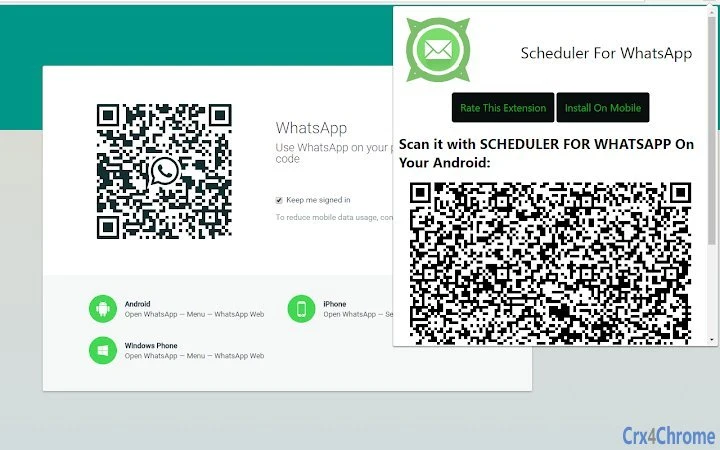

Schedule WhatsApp Messages from Your Browser
Overview
The Scheduler for WhatsApp extension is a browser-based tool designed to enable users to schedule WhatsApp messages through an Android companion app. It serves as a bridge between desktop browsers and mobile WhatsApp, allowing message automation without requiring constant phone interaction. This tool is particularly useful for professionals, marketers, and individuals who need to send timely messages across different time zones or during off-hours.
The extension does not function independently—it requires the installation of the WhatsApp Auto Messages app on an Android device, which handles the actual message delivery. The browser extension’s primary role is to trigger and manage the scheduling process, making it ideal for users who prefer managing communications from their desktop environment. Real-world use cases include sending reminders, appointment confirmations, or promotional content at specific times, even when the user is away from their phone.
Target users include digital marketers, customer support teams, educators, and anyone managing multiple communication channels. The tool supports cross-platform workflows, as it operates on Windows, Mac, and Linux systems, ensuring broad accessibility. While the developer’s background is not detailed, the integration model suggests a focus on seamless automation between mobile and desktop ecosystems.
Key Features & Capabilities
- Message Scheduling via Browser – Users can compose and schedule WhatsApp messages directly from their browser, eliminating the need to open the mobile app repeatedly.
- Integration with Android App – The extension communicates with the WhatsApp Auto Messages app installed on Android devices, enabling message delivery even when the phone is locked or idle.
- Time-Based Automation – Messages can be set to send at specific times, supporting recurring schedules or one-time deliveries across different time zones.
- Remote Triggering – The extension allows users to start the Android app remotely, which is especially useful for initiating automation workflows from a desktop environment.
- Cross-Platform Support – Compatible with Windows, Mac, and Linux, ensuring consistent access regardless of the user’s operating system.
These features streamline message management by centralizing scheduling tasks on the desktop. For example, a marketer can draft a promotional message during work hours and schedule it for delivery at 9 PM local time. A teacher might send a weekly reminder to students at the same time each week without manual intervention. The workflow is efficient, leveraging automation to reduce repetitive tasks while maintaining reliability.
User Interface, Workflow & Performance
The user interface of the Scheduler for WhatsApp extension is minimal and focused on functionality, consistent with typical browser extension design. It integrates directly into the browser’s toolbar, providing quick access to scheduling controls. Navigation is straightforward, with a clean layout that prioritizes message composition and scheduling settings.
Workflow efficiency is enhanced by the seamless connection between the browser and the Android app. Once the initial setup is complete, users can schedule messages with minimal steps. The extension does not require continuous background operation, reducing potential performance impact. However, exact performance details were not specified by the developer, including CPU or RAM usage during operation.
Stability appears to be maintained through reliance on the Android app for message execution, which helps isolate the extension from potential crashes or freezes. The developer did not provide additional system requirements or resource usage data. General software behavior patterns suggest low overhead, but specific observations are not available. Users should expect standard browser extension performance levels under normal conditions.
Compatibility & System Requirements
The extension is compatible with Windows, Mac, and Linux operating systems, supporting a wide range of desktop environments. It is designed for use with modern web browsers that support extensions, though specific browser versions were not listed.
The installation size is 2.1 MB, indicating a lightweight footprint that should not significantly impact system storage. The software version is 1.0.0, released on May 15, 2024. No hardware requirements were provided, and the developer did not specify minimum system specifications.
Compatibility information is limited to the operating systems mentioned. No details were shared about required browser versions, internet connectivity needs, or background processes. The developer did not specify whether the extension requires a persistent internet connection after setup. Platform compatibility details are partially provided, with no further technical constraints disclosed.
Pros and Cons
Pros
- Enables scheduling of WhatsApp messages from desktop browsers
- Works even when the phone is locked or idle
- Supports cross-platform use across Windows, Mac, and Linux
- Lightweight installation at 2.1 MB
- Free to use with no licensing fees
Cons
- Requires a separate Android app for core functionality
- Dependent on mobile device being powered on and connected
- No detailed system requirements or performance data provided
- Setup may be confusing for users unfamiliar with the Android companion app
- Relies on internet connection for browser communication
FAQ Section
Is the Scheduler for WhatsApp extension free?
Yes, the extension is available at no cost. There are no subscription fees or in-app purchases required to use its core scheduling features.
What Android app is required to use this extension?
The extension requires the WhatsApp Auto Messages app to be installed on your Android device. This app handles the actual message delivery and must be set up before using the browser extension.
Can I schedule messages without keeping my phone on?
The Android app must be running on the device for scheduled messages to be sent. The phone should remain powered on and connected to the internet. The extension can trigger the app remotely, but the device must be active.
Is the extension secure?
The extension communicates with the Android app via standard browser and mobile app protocols. No sensitive data is stored by the extension itself. Users are advised to install the app from official sources and ensure their device is protected with up-to-date security measures.
How often does the extension update?
Updates are released as needed by the developer. The current version is 1.0.0, released on May 15, 2024. Users should check for updates through their browser’s extension manager.
Final Thoughts + CTA
The Scheduler for WhatsApp extension offers a practical solution for users seeking to automate WhatsApp messaging from their desktop. Its ability to trigger message delivery through an Android companion app makes it a reliable tool for time-sensitive communications, especially in professional or educational settings. While it relies on an external app and has limited system details, its lightweight design and cross-platform compatibility enhance usability.
For individuals managing multiple contacts or time zones, this tool streamlines workflow and reduces manual effort. The absence of cost and the straightforward setup process make it accessible to a broad audience. However, users should be aware of the dependency on their mobile device and the need to install an additional app.
Overall, it delivers on its promise of scheduled messaging with minimal friction. If you're looking to automate WhatsApp communications from your computer, this extension is a solid choice.
Download Scheduler for WhatsApp Extension now







